













Archives & Museum Informatics
158 Lee Avenue
Toronto, Ontario
M4E 2P3 Canada
info @ archimuse.com
www.archimuse.com

|
Search A&MI |
Join
our
Mailing List.
Privacy.
published: April, 2002
© Archives & Museum Informatics, 2002.


e-Docents: Shifting the Docents Business Paradigm
Ilana Trager, Bellevue Art Museum, USA
Abstract
Bellevue Art Museum combines elements of a traditional art museum with a school, art studio and community center, with a focus on contemporary art. The interpretive methodology reflects the multi-faceted nature of the organization. The Museum relies heavily on a fusion of contextual information, interactive teaching methods, hands-on art experiences, and 150 knowledgeable docents.
The Docent Extranet Project at Bellevue Art Museum was conceived to meet the following goals: to increase the administrative efficiency of the docent program, to increase the docents’ reservoir of tools, to improve staff/docent communications and relations, and to culminate in a positive impact on the visitor experience.
The Docent Extranet is a private network built on Internet technology, intended to bring information to the docent, rather than making the docent search for information. In a cooperative effort to replace the old “binder” system, Museum staff, consultants and docents are shifting the docent business paradigm, using web technology to provide new ways of learning, teaching, researching and communicating.
The wide scope and challenging nature of this project became clear early on in the planning process. The extranet includes online initiatives such as tour and gallery duty scheduling, research materials and resources, administrative documentation, intradepartmental forms, continuing education opportunities, and a list server.
This paper will examine the actual process of developing the Docent Extranet, including: technical specifications, project participants’ roles and responsibilities, user interface and design, training methods, evaluation and future plans.
Keywords: Docents, Extranet, Volunteers, Active Server Pages, ASP
Introduction
In January of 2001, Bellevue Art Museum opened its doors in a newly constructed facility. The Museum moved into a space three times as big as the old one, with three times as much programming. Learning to operate in a new, bigger space was a challenge for all the Museum workers, including staff and volunteers.
The docents had been keeping their schedules in a binder at the Museum, with their tour duties written in. If they wanted to check their schedule to see if a tour had been assigned to them during one of their shifts, they had to physically travel to the Museum. If they needed to switch shifts with another docent, they needed to visit the Museum to make that change. A system that worked in the smaller space, with fewer tours and fewer staff, began to break down in the new building. The docents began experiencing attendance problems due to scheduling confusion and a general lack of enthusiasm.
The Docent President approached me in May 2001. She said that the docents wanted to put their schedule on-line. They didn’t know what to do or how to do it, but they recognized that “penciling it in” wasn’t working for them anymore. In our first meeting, she told me that the docents wanted to be able to access, sort and change their schedules from outside the museum, so they wouldn’t have to drive in to see whether or not they needed to be there. They also wanted to improve their communication, and put the documents governing their group and guiding their activities on-line. They wanted to be able to send their meeting minutes out electronically, and to access their research materials over the Internet. But the ultimate goal was to eliminate the binder system.
They knew from their roster that out of 115 active docents only about 10 did not have email. The assumption was that 91% of the docents would be perfectly comfortable operating with an online scheduling system and would be able to access it from their homes. The rest could use the computers in the Museum’s library, which were already designated for the docents’ use.
The docents’ commitment to the idea was clear, and I recognized the value of what they wanted to accomplish. I agreed to do the project, but not without some reservations. I was concerned that the docents would resist using a non-binder system, despite assurances from docent leaders that they were all looking forward to getting their schedules online. I feared that if we built something without fully understanding the true needs of the docents that it would be useless and therefore unused. I was also rather busy with the usual demands of my job, and knew I would have to budget my time carefully.
So along with my commitment to the project, I had some caveats. They were as follows:
- We needed to document our plan
very carefully and even more thoroughly. The inherent challenge in
the project was working with the docents, a highly committed group but
also one with very little technical experience. I quickly recognized
that the docents were not able to understand and get a mental image
of processes that I would describe dismissively, saying “Oh, yeah,
we’ll just set up an Access backend with an asp front end.”
The plan needed to include page-by-page descriptions of purpose and
functionality, and a chart demonstrating the logic behind the navigation
of the site.
- I didn’t have the time to
do all the work myself. I required active participation on the part
of the Docent President, and preferably the entire docent council, to
gather the content for the extranet and present it to me in a usable
format. Additionally, I wanted to get help from the Museum’s web-developer,
who offered to do a great deal of the work for a minimal flat fee.
Part of the overall project plan was a careful documentation of who
the participants were and what they would each do.
- I wanted to ensure that the extranet
would be a success. The first measure of success would be if the docents
used it. We purposely decided not to approach the project with an “if
we build it, they will come” attitude. The docent president and
I worked together to plan out how we would make the extranet as usable
as possible, and then present the docents with the extranet. We planned
to not just train them and orient them to use it, but veritably indoctrinate
them with a new business paradigm. We also worked out a strategy for
evaluating the project over time.
- The extranet had to be sustainable in the future. The current president was very committed and was willing to do whatever she could to get the extranet implemented, but the docent council changes yearly, and what if the next president couldn’t or wouldn’t keep it going? What if the staff didn’t become engaged, and resisted contributing content and administrative support for the extranet? We had to look past implementation to determine whether the processes we were putting in place would be sustainable by both staff and docents.
Technical Specifications
The technology of this project hasn’t broken any new ground - in fact the platform we used is somewhat mundane. This was a deliberate choice. We wanted the extranet to be simple to administer, as it would be simple to use. The real novelty of this project was working with a group of self-governing volunteers who usually manage themselves almost completely independently from the Museum administration, and who are statistically in an age group that tends to have limited computer experience.
The scope of the project was simple. We decided to build a website with about 25 pages, using FrontPage2000 as the web editor. The front end would be done in asp, with an Access 2000 database to store the schedule and roster information. The web site would be hosted on the Museum site, http://www.bellevueart.org, in a password-protected folder to protect the docents’ personal information and ensure that only the docents or staff with access would be able to make changes to the schedule. The docents would be able to make limited changes to the schedule by logging on to the extranet, but the administrative portion would be located in a different location that the staff could access to update the rosters and add scheduled tours. The entire extranet would not exceed 3 megabytes of hard disk space, and the entire project would cost $500.
This is the original chart of the site that shows it as-built. The site has changed somewhat, and later on in this paper a new chart will be available demonstrating those changes.

Fig. 1: Organizational Chart of the Bellevue Art Museum Docent Extranet
Project Participants
The following roles and responsibilities were documented thoroughly in the project plan. Common practice at museums with volunteer personnel is to provide a staff person to be a conduit between the volunteer group and other staff, and Bellevue Art Museum is no exception. Originally, we intended to observe that tradition and work with the designated liaison from the education department, but in recognition of the unusual nature of the project, we quickly eliminated the middleman and worked directly with the docents.
The 2001 Docent President, Nancy Rignel, was a pivotal member of the project team. As the manager of the docent program, she consulted with me on every aspect of planning and managing the extranet project, and took on the responsibility of content delivery and coordinating training for the docents to learn how to use the extranet’s functionality. She also accepted responsibility for providing mentoring for the docents who required special attention and remedial training in general computer use, and led several of the standard trainings.
As Bellevue Art Museum Information Systems Manager, I took on overall project management, with a commitment to future administration of the extranet. The largest part of my responsibility was to put together the project plan, including goals, objectives, and functional requirements. I designed the navigation of the site and built the asp pages and the database. I consulted with the web developer on design, layout and functionality. I also planned the training strategy for the docents, led most of the general trainings, and assisted with special trainings as necessary.
The Museum’s web developer, Scott March, implemented the web site. He set up a secure section of the Bellevue Art Museum web site, added a docent user account with access to secure section, and prepared all design elements. Scott also provided his programming expertise, mostly for asp scripts and database routines. He hooked up the asp pages I provided for him to the Access 2000 database, adding and modifying asp pages as necessary. Scott provided the functionality of the site by setting up the routines and forms for docents to query and update the schedule. He also designed a secure administrative interface for staff to use in updating roster and tour information.
Other project participants included the Education Coordinator, who helped specify the business requirements of the database, and members of the docent council, who provided content for the site.
User Interface and Design
Our intention for the user interface and design elements of the site was to keep it simple. We felt that if the site were easy to use, the docents would be that much more likely to use it. We wanted the site to carry the Museum’s identity, but we placed much more importance on functionality than aesthetics. We had a captive audience who would only be irritated by unnecessary graphical elements or flashy design. Even so, the docents are a visually sophisticated group, and the agreement was that the design would be clean and uncluttered, yet had to live up to the standards set by the Museum’s public website.
Additionally, we wanted the site to be easy to maintain. We developed style sheets containing default formatting information and a header and footer containing the main navigational elements so every page look consistent to the user, and building new or editing existing pages would be easily accomplished.
The homepage of the website includes navigational elements and the Museum logo.

Fig. 2: Bellevue Art Museum Docent Extranet: Main Page
The schedule page allows the docents to search their schedules by date, docent name, exhibit and type. Type includes gallery duty, school tour or specially scheduled tour.

Fig. 3: Bellevue Art Museum Docent Extranet: Schedule
Searching brings up an asp page created on the fly, sorting the tours in order of date and time.

Fig. 4: Bellevue Art Museum Docent Extranet: Schedule
If the docent needs to swap tours with another docent, they simply click on any tour record element to bring up the change form.

Fig. 5: Bellevue Art Museum Docent Extranet: Schedule Change
The research page provides links to research materials developed by the curatorial staff and docents, designed to prepare docents to give tours.
The Docent Info page provides links to the docent roster, meeting minutes, a calendar listing, Exhibition Guidelines, the By-laws of their organization and the Museum’s learning plan.
The Provisional Info page has links to information for docents-in-training, including their calendar, their mentor roster, and training materials.
Museum Info includes a staff roster, as well as the Museum’s customer service policy, the emergency plan, and computer use policy.
The links page is simply a listing of hyperlinks to the websites of other museum in the Seattle area and contemporary visual arts organizations around the country.
Naturally, there have been changes in the original plan for user interface and design. Even during the implementation process there were changes to the overall schema, as we found better solutions through tinkering than we could have through planning.
Some of the changes are a result of having our most basic assumptions challenged, yet have significant ramifications. For example, the original plan assumed that pages with static documentation would be built in html (don’t be fooled by the .asp extensions). This was not explicitly stated, however, and we found that it was preferable to build a menu page for each section in html, but to publish the research information and other documents as PDFs. The benefits of the PDFs compared to pages done in html are: they’re easier for us to publish to the site, and the docents can print them out with a better result. Some of the docent’s “old eyes” are actually made uncomfortable by reading from a computer screen, so publishing PDFs is a matter of not just convenience, but access as well.
This chart demonstrates the changes in the extranet, with additions highlighted in yellow.
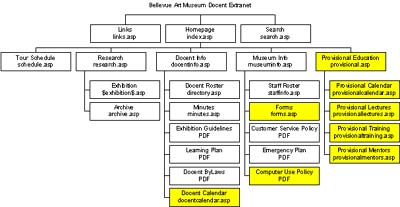
Fig. 6: Organizational Chart of Bellevue Art Museum Extranet, version 2.
Training Methods
The training portion of the project included several elements:
- The extranet was demonstrated to the entire docent body at their monthly meeting in September 2001.
- In order to give them hands-on experience, we scheduled performance-based trainings in the Museum library, which houses three computers with Internet access. By doubling up the docents 2 to a computer, we were able to accommodate 6 docents per training, with a total of 66 docents participating in 11 trainings.
- Special trainings are continually made available for docents who feel they need more remedial help or training in general computer use.
- A standard email was sent to docents containing the extranet’s URL, username and password, and brief instructions in its use.
- A business card printed with the extranet’s URL, username and password, and brief instructions in accessing it from home, was distributed to all the docents.
- Periodic emails and demonstrations on subjects such as how to download, install, and use Adobe Acrobat Reader, are planned throughout the year.
Evaluation
Other than the list server portion of this project, we believe the original goals and objectives of the project have been met. Our primary goal, to create efficiencies for the Docent program using information and web technology, appears to have been met. By its very existence, the extranet has drastically reduced the amount of time and money spent on mailings as well as travel time for the docents.
The measure for success is not just how many docents use it, but also which parts they’re using most. If we were successful in our goals, then the functions of the extranet representing efficiency over the old business system should get the most use; specifically, Schedule, Research and Minutes. The following chart represents the percentage of docents actually utilizing each function of the extranet:

Fig. 7: Percentage of docents using each function
Our second goal was to electronically augment docent communication with each other and with BAM staff. Posting documentation such as the Docent Bylaws and Exhibition Guidelines, as well as the Museum’s policies on customer service, emergency procedure and computer use have enabled all staff and docents to work from the same informed perspective. The addition of the docent and staff rosters on the site with names, phone numbers, and live email address links have promoted an ease of communication previously impossible.
Observations of the docents (and staff) as they work are constantly re-assessed and re-interpreted to help determine our status on the docent extranet project, but the primary method of evaluating the overall success has been to survey the docents. 88% of the respondents to a January 2002 survey said they have used the extranet. We also asked the docents to evaluate the training they received, and the level of difficulty in logging on to the extranet and learning to use it. 65% said they were satisfied with the training they received. 75% said they felt the logon procedure is simple, and 63% said they felt the extranet is simple to use.
Future Plans
For the next 6 months we will continue to evaluate the level of usage, as well as the general computer skill level of the docents. According to the January 2002 survey, the average docent user has 8 years of experience with personal computers, 98% have computers in their homes, and 93% have email. The numbers, though, can be misleading. They do not represent depth of experience. For example, we have discovered that while the docents may be experienced in sending an email, many may not know how to send an attachment. At this time the level of computer skill among the docents fluctuates from complete novice to expert. Future surveys will evaluate the depth of skill amongst the docents, and future training will be geared to bring all the docents to a higher average expertise. The docents have expressed an interest in taking over some of the administration of the site, such as scanning the images for the research portion, as well as training and mentoring each other as new docents learn to use the system. As the docents’ average skill level increases, they will be able to take a more active role in these activities. As the docents’ skills grow, we will plan to add more functionality to the site appropriate to the sophisticated level of user that they will someday become.